An internet outage can stop customer calls, cloud applications, payments, and work across your locations. A business internet SLA sets out what a provider commits to deliver, how it measures service, and what happens when targets are missed. However, an uptime percentage alone doesn’t show how quickly faults are fixed or whether service credits apply. This guide explains uptime, repair times, latency, exclusions, and connection types in plain language. This guide explains what an internet SLA covers, how business agreements differ from residential best-effort service, which performance measures matter, and what to review before signing a contract with an internet provider.
Key Takeaways
Check More Than Uptime
Review latency, packet loss, response times, MTTR, exclusions, and service credits before judging an SLA.
Define Repair Commitments Clearly
Confirm when the repair clock starts, what restoration means, and how escalation works during an outage.
Review Exclusions Before Signing
Understand scheduled maintenance and other exclusions that may remove downtime from SLA calculations.
Protect Critical Business Operations
Use redundancy and failover where an internet outage could disrupt VoIP, cloud systems, payments, or essential workflows.
Get Terms In Writing
Make sure negotiated uptime, restoration, credits, and escalation terms appear clearly in the final contract.
What A Business Internet SLA Covers
A business internet SLA defines the service standards the provider offers. Generally, it covers uptime, availability, latency, packet loss, response time, restoration, and maintenance. A clear SLA also states exclusions, scheduled maintenance, and service credits. Review these terms before finalizing the contract to support uninterrupted business operations.
Business SLAs Versus Residential Best Effort
A business internet SLA sets measurable commitments that a residential best-effort connection typically does not. Business service may include defined uptime, response times, escalation procedures, and service credits. This structure gives businesses clearer expectations for network performance, especially when downtime can disrupt sales, cloud applications, VoIP, or daily operations.
Why Uptime Matters For VoIP And Cloud
When internet service fails, cloud phone systems, video meetings, payment tools, and hosted business applications may become unavailable. A short outage can interrupt calls or disconnect users from essential systems. A strong SLA sets an uptime commitment and backup connectivity. Better availability reduces service disruption and supports more predictable business continuity.
Uptime Percentages And Allowed Downtime Explained
An uptime percentage shows the availability level an SLA promises. Even a small percentage difference can change the amount of allowed downtime over a year. For example, 99.9% uptime allows about 8 hours and 46 minutes of downtime per year. Reviewing the calculation method, measurement period, and exclusions prevents misleading assumptions about actual availability.
Latency, Jitter, And Packet Loss Targets
Uptime alone does not guarantee clear calls. Latency measures delay, jitter measures changes in that delay, and packet loss means voice data fails to arrive. Increased issues can affect VoIP, video meetings, cloud applications and remote systems. A useful SLA sets measurable network performance targets instead of focusing only on bandwidth. These limits provide clearer expectations for connection quality.
Response Time, MTTR, and Four-Hour Repair
Response time shows how quickly a provider responds to a reported fault, while MTTR measures the expected restoration period. A four-hour repair commitment may apply only to certain faults, service tiers, or locations, which can reduce prolonged downtime. However, the contract should define when the clock starts and what conditions apply. Clear escalation rules provide additional protection when restoration takes longer.
Service Credits, Remedies, And Common Exclusions
Service credits can provide a financial remedy when an SLA target is missed, but credit terms vary by contract, and they rarely cover the full cost of lost business. Common exclusions include scheduled maintenance, customer equipment, third-party networks, force majeure events, and outages caused by customer actions. Before signing, check eligibility, credit limits, claim deadlines, and whether exclusions could remove protection during a significant outage.
Which Connection Types Carry Stronger SLAs
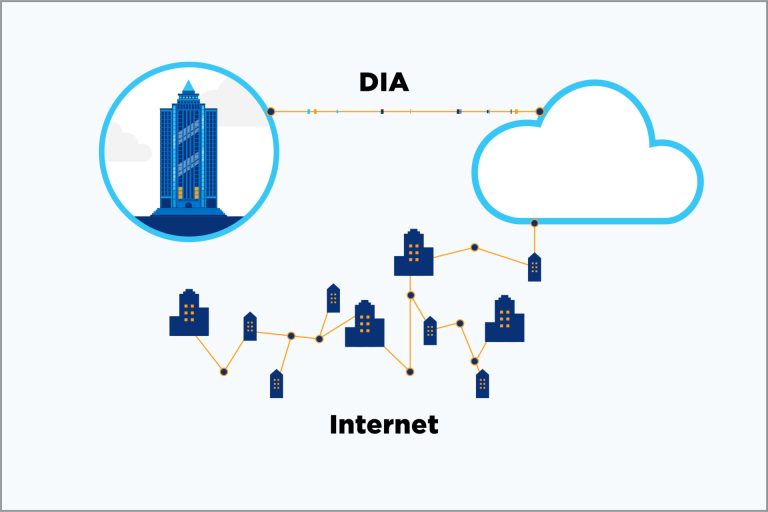
Dedicated internet access (DIA) often offers stronger SLA commitments than best-effort broadband because it’s designed for business use and can include defined uptime, latency, packet loss, and restoration targets. Fibre DIA may offer symmetrical bandwidth and clearer performance commitments. Fixed wireless and LTE can also support business SLAs, depending on provider terms and coverage.
Practical Tips
Confirm how uptime gets measured
Check the SLA’s measurement method, calculation period, and downtime exclusions so the stated uptime percentage reflects the availability your business actually receives.
Get the MTTR commitment in writing
Confirm the repair target, when the repair clock starts, and whether onsite support is included so IT teams can plan for outages with clear restoration expectations.
Check the credit claim process
Confirm how service credits are calculated, whether claims are automatic, and the deadline for requesting compensation after an SLA breach.
Map exclusions and maintenance windows
Review scheduled maintenance, customer equipment, third-party networks, and other exclusions to identify outages that may not qualify for SLA protection.
Confirm 24/7 monitoring and escalation
Verify that monitoring runs 24/7 and identify the escalation contact for critical outages so urgent issues reach the right support team outside business hours.
Negotiate terms before you sign
During contract negotiations, address uptime, response time, restoration, service credits, and exclusions to secure terms that match your operational requirements.
Add a backup connection for failover
Pair the primary business internet service with a separate connection so critical traffic can continue during an outage or extended restoration period.
Common Mistakes To Avoid
Choosing on uptime percentage alone
Focusing on a high uptime percentage can mask poor latency, packet loss, slow restoration, or strict exclusions that significantly affect critical applications.
Assuming residential plans include SLAs
A residential best-effort plan may leave outages without defined response times, restoration targets, or service credits, making recovery from prolonged disruptions difficult.
Confusing response time with repair time
Treating a quick response as a fast repair commitment can leave business systems offline for hours.
Missing the service credit claim window
Missing the claim deadline can eliminate an eligible service credit, leaving the business to absorb downtime costs even when the provider failed to meet the agreed SLA.
Ignoring scheduled maintenance exclusions
Overlooking maintenance exclusions creates more downtime than the headline uptime percentage suggests and significantly reduces the SLA’s practical protection.
Skipping redundancy at critical sites
Relying on a single internet connection can cut off phone systems, cloud applications, and customer calls during an outage, leaving critical locations unable to operate normally until service returns.
What is an SLA for an internet service provider?
An SLA for an internet service provider is a written agreement that defines measurable service commitments. It may cover uptime, availability, latency, packet loss, response times, restoration, monitoring, and service credits. The contract should also explain how performance is measured, which outages are excluded, and what steps customers must follow when service falls below the agreed level.
What does a 4-hour SLA mean?
A 4-hour SLA usually means the provider commits to a defined action within four hours, but the exact obligation depends on the contract. It may cover a four-hour response, repair, or restoration target. Check when the clock starts, eligible faults, what counts as restored service, and any exclusions.
Is 99.9% uptime the same as 99.99% uptime?
No, a 99.9% uptime commitment allows more downtime than 99.99%. Over a 365-day year, 99.9% permits about 8 hours and 46 minutes of downtime, while 99.99% permits about 53 minutes. The difference can matter for businesses that depend on continuous cloud access, VoIP, payments, or other online systems.
Can I get an SLA on a residential internet plan?
Most residential internet plans are offered on a best-effort basis and may not include a formal SLA. Residential plans typically lack guaranteed uptime, defined response times, repair targets, or service credits. If outages affect business operations, compare business-grade plans and their written SLA terms.
How do I claim service credits after an outage?
Start by checking the contract for the service credit rules, including eligibility, calculation, evidence, and claim deadlines. Document the outage details and confirm that the event qualifies under the SLA. Submit the claim through the stated process before the deadline, then retain the confirmation and supporting records for future reference.
Can I negotiate SLA terms with my internet provider?
Yes, you can sometimes negotiate SLA terms, especially for business internet service contracts. Discuss uptime, response times, MTTR, service credits, exclusions, escalation, and maintenance windows before signing. Ask for agreed changes in the contract rather than relying on sales discussions, so the final obligations are clear and enforceable.