

Large organizations today need more than a dial tone. For a Canadian enterprise with more than 100 employees and numerous locations in cities such as Toronto, Vancouver or Montreal, communication is the lifeblood of an enterprise. Standard small business VoIP often falters in the face of the complexities of routing across the globe, multi-tier auto-attendants, and the rigid security needs of PIPEDA or CRTC related regulations.
As a leading channel partner, CanComCo assists organizations to navigate in this crowded market. We assess and deploy leading edge solutions that bridge the divide between legacy reliability and modern cloud agility. This guide dissects the best enterprise VoIP phone providers in Canada to ensure that your business stays connected with 99.999% uptime and enterprise grade security.
What Is Enterprise VoIP?
Enterprise VoIP is a cloud-based VoIP system that is capable of supporting high capacity for organizations and is designed for large-scale organizations. Unlike basic residential or SMB plans, an enterprise communication platform supplies the infrastructure to support thousands of concurrent users across geographic locations between the distributed users.
While small businesses are interested in low costs, enterprises are interested in scalable phone systems that tie in with existing tech stacks such as Salesforce CRM, Microsoft Teams, and HubSpot.
Key Differences from Small Business VoIP:
- Infrastructure :- Support for SIP trunking and hybrid deployment models.
- Reliability :- Contractual Service Level Agreements (SLAs) guaranteeing 99.999% uptime.
- Administration :- Advanced role-based access controls and centralized management for thousands of extensions.
- Support :- Dedicated account managers and 24/7 technical priority.
Benefits of Enterprise VoIP for Large Canadian Organizations
Real-Time Scalability for Enterprise Growth
Enterprises often experience rapid expansion or seasonal shifts. A cloud PBX solution allows you to add hundreds of lines instantly across new branches without installing physical hardware.
Significant Cost Reduction at Enterprise Scale
Switching from traditional landlines to an internet phone system can reduce operational costs by up to 50%. Enterprises save significantly on long-distance charges and maintenance of on-premise PBX hardware.
Enterprise-Grade Security and Compliance
For Toronto-based financial or legal firms, data residency is critical. Top providers now offer Canadian data centers, ensuring that call recordings and metadata comply with PIPEDA and CRTC mandates.
Cloud-Hosted vs. On-Premise vs. Hybrid Enterprise VoIP
| Deployment Model | Best For | Key Advantage |
| Cloud-Hosted | Distributed/Remote Teams | Rapid deployment; zero hardware maintenance. |
| On-Premise IP PBX | High-Security Environments | Total control over data and internal network. |
| Hybrid VoIP | Gradual Migration | Bridges legacy hardware with cloud features. |
Top 10 Enterprise VoIP Providers for Canadian Organizations
Finding the right enterprise communication platform is critical for maintaining operational efficiency and business continuity. Below is a high-level comparison of the top providers serving the Canadian market in 2026.
Enterprise Comparison Table
| Provider Name | Best For (Enterprise Use Case) | Starting Ent. Price (CAD/User) | Uptime SLA | User Capacity | Global Calling Coverage | Key Enterprise Features |
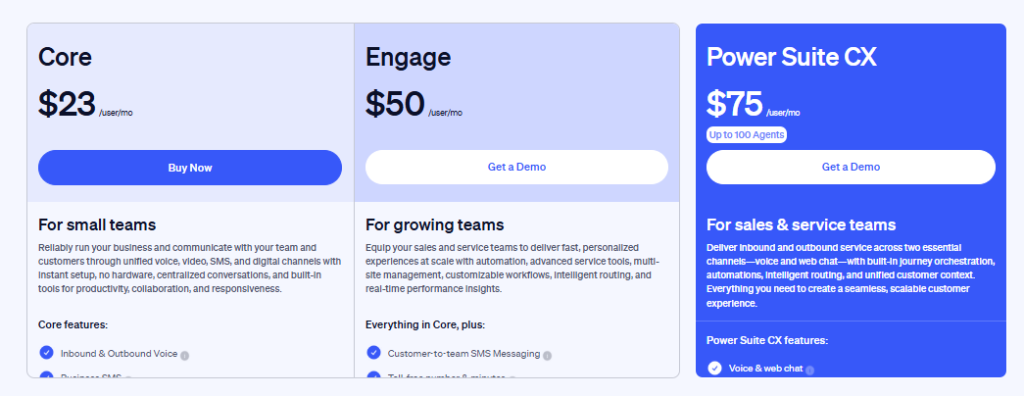
| Nextiva | Customer Experience (CX) Focus | ~$23.00 | 99.999% | Unlimited | US & Canada | Call Pop, Customer Journey Analytics, CRM Integration, Multi-Site Admin |
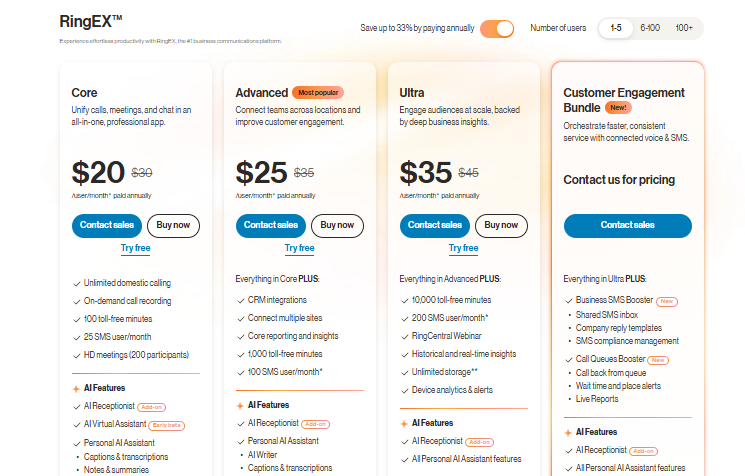
| RingCentral | Global Multi-Location Corps | ~$20.00 | 99.999% | Unlimited | 45+ Countries | SIP Trunking, Global Office, Quality of Service Reports, Hot Desking |
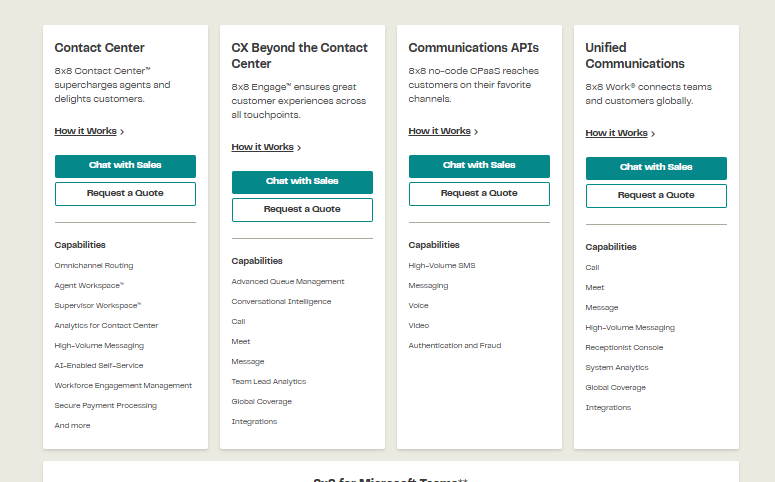
| 8×8 | High Security & Global Teams | On Request | 99.999% | Unlimited | 48+ Countries | End-to-End Encryption, Omnichannel Routing, Workforce Management, Supervisor Analytics |
| Dialpad | AI-Driven Intelligence | ~$15.00 | 100% | Unlimited | US & Canada (+Intl Add-ons) | Real-Time Transcription, Sentiment Analysis, AI Coaching, Google/Microsoft SSO |
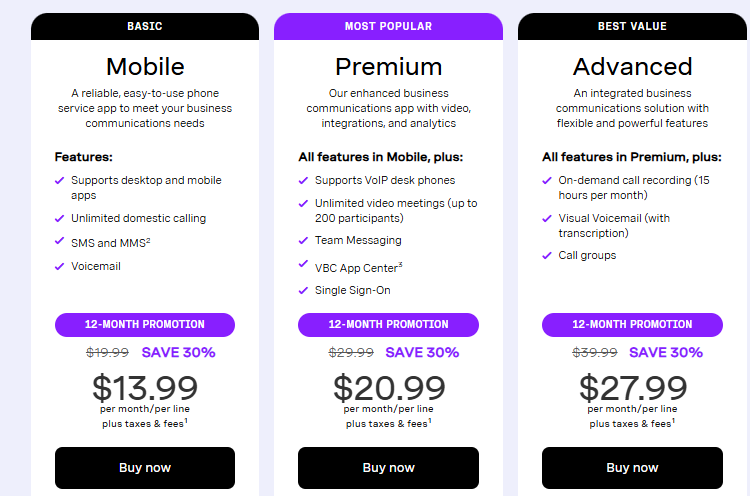
| Vonage | API Customization & Retail | ~$35.00 | 99.999% | Unlimited | 13+ Countries (Tiered) | Programmable Voice APIs, SD-WAN, App Center, Visual Voicemail |
| GoTo Connect | Simplified IT Management | On Request | 99.99% | 1,000+ | 50+ Countries | Visual Dial Plan Editor, Remote Support Tools, Advanced Ring Groups, Hot Desking |
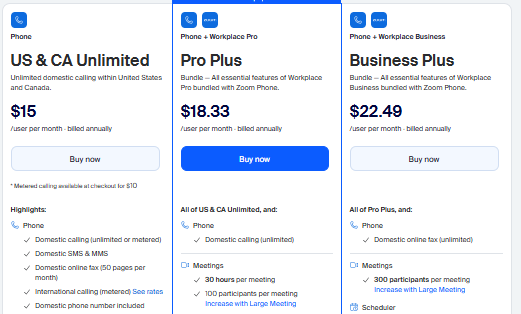
| Zoom Phone | Video-First Collaboration | ~$15.00 | 99.999% | Unlimited | 40+ Countries | Native Zoom Meetings, Elevation to Meeting, Salesforce Integration, Power Pack |
| Mitel | Hybrid/On-Premise Transitions | Quote Only | 99.999% | Unlimited | Global (Carrier Dependent) | Hybrid Deployment, Contact Center, Call Recording, ERP Integration |
Detailed Comparison Of Providers
Below is an in-depth review of each enterprise VoIP phone provider, analyzing their suitability for large-scale Canadian operations.
1. Nextiva
Overview
Nextiva is widely recognized as a top-tier cloud-based VoIP system that prioritizes the customer experience. Rather than just offering a dial tone, Nextiva unifies voice, video, and collaboration into a single “Threaded Conversation” stream. For Canadian enterprises, Nextiva offers robust reliability and a user-friendly interface that simplifies complex call routing.
Enterprise Features (Detailed)
- Customer Journey Analytics :- View a customer’s entire interaction history instantly when they call.
- Enterprise Administration :- Centralized portal to manage users across multiple locations, including Toronto, Montreal, and Vancouver.
- Call Flow Builder :- Visual editor for creating complex IVR (Interactive Voice Response) menus.
- Salesforce & HubSpot Integration :- Deep two-way syncing for CRM integration ensures data consistency.
Who Is It For?
Nextiva is ideal for enterprises heavily focused on sales and support, where call center solutions are as important as internal communication.
Why Do We Choose It?
We selected Nextiva for its “Amazing Service” guarantee. Their support team is exceptionally responsive, which is critical for business continuity during large-scale deployments.
Pros and Cons
| ProsCustomer Service: Their “Amazing Service” guarantee ensures exceptionally responsive 24/7 support, which is absolutely critical for maintaining business continuity and resolving technical issues quickly during large-scale deployments.Reliability: They offer a robust 99.999% uptime guarantee, ensuring that your enterprise communications remain fully operational without interruption, which is vital for maintaining professional standards and trust.Unified Analytics: The “Threaded Conversation” feature and Customer Journey Analytics allow users to view a client’s entire interaction history instantly, unifying voice, video, and collaboration into one seamless stream. | ConsTiered Features: Accessing the most powerful enterprise tools requires subscribing to higher-tier plans, potentially pushing the overall cost per user beyond the budget of cost-conscious organizations.International Costs: While domestic calling is standard, their international calling rates can be significantly higher compared to competitors like 8×8, making them less ideal for companies with heavy overseas communication.Learning Curve: The shift to a “Threaded Conversation” stream rather than a traditional dial-tone interface may present a slight learning curve for employees accustomed to legacy phone systems. |
Pricing & Plans
2. RingCentral
Overview
RingCentral is a powerhouse in the Unified Communications (UCaaS) space. It offers the most comprehensive set of features for global enterprises. With Canadian data centers, it addresses local data residency concerns while providing a seamless hosted PBX system.
Enterprise Features (Detailed)
- Global Office :- Configure local numbers in over 45 countries with a single bill.
- Multi-Site Management :- Granular control over different branch offices from one dashboard.
- Quality of Service (QoS) Dashboard :- Real-time monitoring of jitter and latency to ensure call clarity.
- Advanced IVR :- Multi-level auto-attendants with self-service capabilities.
Who Is It For?
Multinational corporations require a unified system across borders. It suits organizations that need immediate scalability and global calling coverage.
Why Do We Choose It?
RingCentral remains the market leader due to its unparalleled app ecosystem. If your enterprise uses a specific software tool, RingCentral likely integrates with it.
Pros and Cons
| ProsGlobal Reach: The “Global Office” feature allows you to configure local numbers in over 45 countries on a single bill, simplifying management for multinational corporations with scattered branch offices.Integration Ecosystem: It boasts an unparalleled app ecosystem and massive integration library, meaning if your enterprise uses a specific software tool, RingCentral almost certainly integrates with it seamlessly.Quality Monitoring: The Quality of Service (QoS) dashboard provides real-time monitoring of jitter and latency, giving IT teams the granular control needed to ensure crystal-clear call clarity across all locations. | ConsImplementation Complexity: The system’s vast array of features can make implementation notably complex for smaller IT teams, potentially leading to a longer and more difficult deployment phase.Support Variance: Customer support response times are known to vary significantly depending on your service tier, which can be frustrating if you are on a lower plan needing urgent help.Cost Structure: As a comprehensive “powerhouse” solution, the pricing and structure can be expensive for organizations that only need basic functionality without the extensive global capabilities. |
Pricing and Plans
3. 8×8
Overview
8×8 stands out for its single-platform approach to cloud communications. It uniquely combines voice, video, chat, and contact center capabilities into one secure application. Security-conscious enterprises in finance and healthcare often prefer 8×8 due to its rigorous compliance standards.
Enterprise Features (Detailed)
- X Series Plans :- Bundled voice and contact center features for streamlined billing.
- Supervisor Analytics :- Speech analytics and live monitoring for quality assurance.
- Global Reach :- Unlimited calling to up to 48 countries on enterprise tiers.
- Secure Voice :- End-to-end encryption that meets strict PIPEDA compliance standards.
Who Is It For?
Enterprises with a significant international footprint or those requiring an integrated call center solution without third-party add-ons.
Why Do We Choose It?
We recommend 8×8 for its global unmetered calling plans. For companies with offices in Europe or Asia, the cost savings on international tolls are substantial.
Pros and Cons
| ProsInternational Value: The X Series plans offer unlimited calling to up to 48 countries, providing substantial cost savings for enterprises that have a significant international footprint or overseas clients.Unified Platform: It uniquely combines voice, video, chat, and contact center capabilities into a single secure application, eliminating the need for third-party add-ons and streamlining vendor management.Security Compliance: Designed for security-conscious sectors, it offers end-to-end encryption and meets strict compliance standards like PIPEDA, making it a safe choice for finance and healthcare organizations. | ConsOutdated Interface: The user interface is widely considered less modern and intuitive compared to newer competitors like Dialpad or Zoom, which may impact user adoption and satisfaction.Technical Setup: Initial configuration and setup often require a higher level of technical expertise, meaning you may need specialized IT staff to get the system running optimally.Rigidity: The single-platform approach, while secure, can be less flexible for companies that prefer to mix and match best-of-breed apps rather than using a pre-bundled suite. |
Pricing & Plans
4. Dialpad
Overview
Dialpad is the most innovative provider on this list, leveraging “Voice Intelligence” (Vi) to transcribe calls in real-time. Built on the Google Cloud Platform, it offers a highly modern, flexible Internet phone system that appeals to tech-forward Canadian companies.
Enterprise Features (Detailed)
- Real-Time Coaching :- AI provides live suggestions to agents during difficult calls.
- 100% Uptime SLA :- Unique to their Enterprise plan, offering total peace of mind.
- Semantic Search :- Search through voice conversations as easily as emails.
- Zero-Touch Provisioning :- Instantly deploy simplified apps to hundreds of users.
Who Is It For?
Modern, distributed workforces that value AI insights. It is perfect for sales teams that need call recording analysis to improve performance.
Why Do We Choose It?
Dialpad’s AI capabilities are native, not bolted on. This results in faster, more accurate transcriptions and actionable insights compared to competitors.
Pros and Cons
| ProsAI Capabilities: Native “Voice Intelligence” provides real-time coaching and transcription, offering sales teams immediate actionable insights and live suggestions during difficult calls to improve agent performance.Uptime Guarantee: They offer a unique 100% Uptime SLA on their Enterprise plan, providing total peace of mind for organizations where even a minute of downtime is unacceptable.Rapid Deployment: Zero-Touch Provisioning allows IT teams to instantly deploy simplified apps to hundreds of users, making it ideal for modern, distributed workforces that need to scale quickly. | ConsHardware Support: Support for traditional desk phones is secondary to the softphone experience, which can be a significant drawback for offices that rely heavily on physical hardware.Global Coverage: While growing, their global calling reach and local number coverage are currently smaller than major competitors like RingCentral, limiting its utility for truly global conglomerates.Network Dependence: As a highly modern cloud-first system, it is heavily dependent on strong internet infrastructure; poor local network conditions can severely impact the quality of its advanced features. |
Pricing & Plans

5. Vonage
Overview
Vonage Business Communications is a flexible solution known for its programmable voice capabilities. It allows enterprises to build custom communication workflows using APIs. This makes it a strong contender for businesses with unique development needs.
Enterprise Features (Detailed)
- Vonage App Center :- A curated marketplace of business apps integrated directly into the dialer.
- SD-WAN :- Optional add-on to prioritize voice traffic and ensure quality over public internet.
- Programmable APIs :- customize SMS, voice, and video functionality within your own apps.
- Virtual Receptionist :- Intelligent routing based on business hours and caller input.
Who Is It For?
Organizations with development resources that want to embed communication into their own software or workflows.
Why Do We Choose It?
Flexibility is the key driver. Vonage adapts to your business logic rather than forcing you to adapt to a rigid phone system.
Pros and Cons
| ProsCustomizability: The platform is highly customizable, allowing organizations with development resources to build unique communication workflows and embed voice or video directly into their own applications via APIs.App Ecosystem: The Vonage App Center offers a curated marketplace of business apps integrated directly into the dialer, enhancing productivity by connecting your phone system with essential tools.Network Optimization: They offer an optional SD-WAN add-on to prioritize voice traffic, ensuring high call quality even when using public internet connections, which boosts reliability. | ConsBasic Core Features: The base feature set is generally simpler than competitors out of the box, meaning you may need to build or configure functionality that others include by default.Add-on Costs: Because the system is modular, advanced features often cost extra, making it potentially more expensive if you require a lot of add-ons to match a standard enterprise suite.Developer Reliance: To fully leverage its “programmable voice” and API capabilities, your organization effectively needs dedicated development resources, which adds to the hidden cost of ownership. |
Pricing & Plans
6. GoTo Connect
Overview
Formerly Jive, GoTo Connect (by LogMeIn) offers an exceptionally easy-to-use cloud PBX solution. Its visual dial plan editor is a standout feature, allowing administrators to map out call flows with a drag-and-drop interface.
Enterprise Features (Detailed)
- Visual Dial Plan Editor :- Visually design complex routing scenarios in minutes.
- Hot Desking :- Allows employees to log in to any shared phone in the office.
- GoTo Meeting Bundle :- Enterprise plans often include their robust video conferencing license.
- Real-Time Wallboards :- Visualize call queues and wait times for support teams.
Who Is It For?
Mid-market companies growing into enterprises that need advanced features without the complexity of a Cisco or Avaya system.
Why Do We Choose It?
The ease of administration is unmatched. IT managers can make changes to call forwarding or ring groups instantly without contacting support.
Pros and Cons
| ProsVisual Management: The visual dial plan editor is a standout feature, allowing administrators to drag and drop elements to map out complex call flows in minutes without coding.Value Bundling: Enterprise plans frequently include their robust GoTo Meeting license, offering significant value by combining a top-tier video conferencing solution with your phone system at one price.Admin Ease: IT managers can make instant changes to call forwarding or ring groups without contacting support, offering unmatched ease of administration for mid-market companies growing into enterprises. | ConsReporting Depth: Large-scale enterprise reporting is less detailed than what is offered by Nextiva or 8×8, potentially leaving data-driven organizations wanting more granular insights into call metrics.Enterprise Scale: While excellent for mid-market, it may lack the extreme depth of global features and compliance tools required by massive multinational corporations compared to RingCentral.Branding Shifts: As a solution formerly known as Jive and now under LogMeIn, the branding changes and platform integrations may feel less cohesive than a platform built from scratch. |
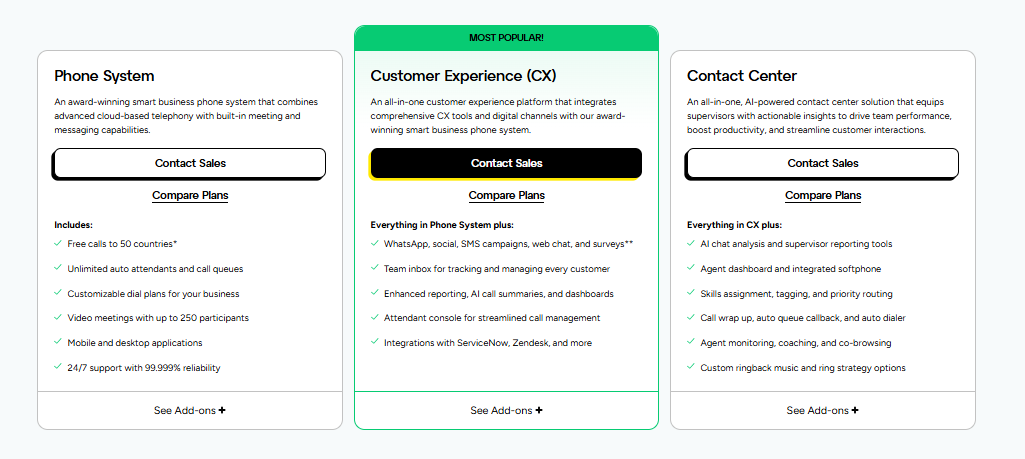
Pricing & Plans
7. Zoom Phone
Overview
Zoom Phone has rapidly disrupted the market by adding enterprise telephony to its ubiquitous video platform. For organizations already using Zoom for meetings, adding Zoom Phone is a logical and cost-effective step toward unified communications.
Enterprise Features (Detailed)
- Elevate to Meeting :- Seamlessly switch a phone call to a video meeting with one click.
- Power Pack :- Advanced desktop experience for high-volume call handlers and receptionists.
- Salesforce Integration :- Log calls and view client data directly within the Zoom app.
- Premise Peering :- Connect existing PSTN lines to the Zoom cloud for a hybrid approach.
Who Is It For?
“Video-first” organizations that want to consolidate their tech stack. It is also excellent for cost-conscious enterprises due to aggressive pricing.
Why Do We Choose It?
Adoption is immediate. Since most employees already know how to use Zoom, training requirements are virtually zero.
Pros and Cons
| ProsUser Adoption: Since most employees are already familiar with the Zoom interface for meetings, training requirements are virtually zero, ensuring immediate adoption across the entire organization.Cost Effectiveness: It is an extremely cost-effective solution, offering aggressive pricing that appeals to cost-conscious enterprises looking to consolidate their tech stack without breaking the bank.Seamless Transition: The “Elevate to Meeting” feature allows users to seamlessly switch a phone call to a video meeting with one click, perfectly suiting “video-first” organizational cultures. | ConsFeature Maturity: As a newer entrant to the voice market, some advanced telephony features found in legacy systems are still in development, which might frustrate power users.Video-Centric: The platform is primarily designed as a video experience first; organizations looking for a traditional “voice-first” workflow may find the interface less optimized for their needs.Support Load: Rapid growth has sometimes strained support resources, and as a massive platform, getting personalized enterprise-grade support might be harder than with a dedicated VoIP specialist. |
Pricing & Plans
8. Mitel
Overview
Mitel is a veteran in the telephony space, offering robust hybrid enterprise VoIP systems. Unlike pure cloud players, Mitel supports complex on-premise and hybrid deployments, making it a favorite for legacy enterprises transitioning slowly to the cloud.
Enterprise Features (Detailed)
- MiCloud Connect :- A dedicated cloud environment with high security.
- CRM Integration :- Links with major ERP and CRM platforms.
- Team Collaboration :- Includes MiTeam for chat, video, and task management.
- Hardware Compatibility :- Excellent support for legacy DECT and proprietary hardware.
Who Is It For?
Traditional enterprises (hotels, hospitals, manufacturing) that rely on specific on-premise hardware or need a gradual migration path to the cloud.
Why Do We Choose It?
Mitel provides stability and a bridge to the future. For companies that cannot move to the cloud overnight, Mitel offers the perfect hybrid compromise.
Pros and Cons
| ProsHybrid Deployment: Mitel supports complex on-premise and hybrid deployments, making it the ideal choice for legacy enterprises that cannot fully migrate to the cloud due to infrastructure constraints.Legacy Support: They offer excellent support for legacy DECT and proprietary hardware, ensuring that businesses with significant investments in physical equipment do not have to replace everything immediately.Proven Stability: As a veteran in the telephony space, Mitel provides unmatched stability and deep telecommunications expertise, offering a reliable bridge to the future for traditional industries. | ConsDated Interface: The cloud interface is widely considered dated compared to modern competitors like Zoom or Dialpad, which may result in a clunky user experience for employees.Complex Setup: The setup process is significantly more hardware-intensive and complex than pure cloud players, often requiring on-site technicians and longer deployment timelines to get operational.Opaque Pricing: Mitel does not disclose its pricing publicly and relies on a quote-based model, which lacks transparency and makes it difficult to quickly compare costs against competitors. |
Pricing & Plans: Mitel does not disclose its pricing and offers quote based pricing.
Critical Enterprise VoIP Features
99.999% Uptime SLA and Redundancy
For an enterprise, five minutes of downtime can cost thousands. We prioritize providers with geographic redundancy to ensure business continuity even during regional outages.
Advanced Call Routing and IVR
Manage thousands of daily calls with ease. Use multi-level auto-attendants and skill-based routing to ensure every customer reaches the right department instantly.
AI-Powered Features
Modern systems use AI for real-time call transcription, sentiment analysis, and automated meeting summaries. These tools transform every conversation into actionable data for your leadership team.
How to Choose an Enterprise VoIP Provider for Your Organization
- Evaluate Your Requirements :- Do you need remote team communication tools or a heavy-duty call center solution?
- Assess Technical Infrastructure :- Check your bandwidth. A general rule is 100Kbps of upload/download per concurrent call.
- Verify Compliance :- Ensure the provider offers end-to-end encryption and adheres to Canadian data protection laws.
- Test Call Quality :- Always conduct a trial to check for jitter and latency on your local network.
Final Words
Selecting the appropriate solution from a lot of VoIP phone providers is a strategic decision that affects the efficiency and bottom line of your company. Whether you focus more on the AI features of Dialpad, or on the global presence of 8×8, the outcome is the same :- seamless, secure and scalable communication.
Ready to modernize your communication stack? CanComCo is here to help you compare quotes and find the perfect fit for your Canadian enterprise.
What is enterprise VoIP Minimum organization size?
While it can be used by anyone, enterprise plans are usually optimized for 100+ users to take advantage of volume pricing and advanced admin tools.
The question is – What uptime SL.A should enterprises require?
Always aim for “five nines” (99.999%). This works out to less than 6 minutes of downtime per year.
Can we retain our current enterprise phone numbers?
Yes. Number porting can make your transition to your new provider as simple as possible by enabling you to port your existing local and toll-free numbers over to your new provider without any disruption of service.


