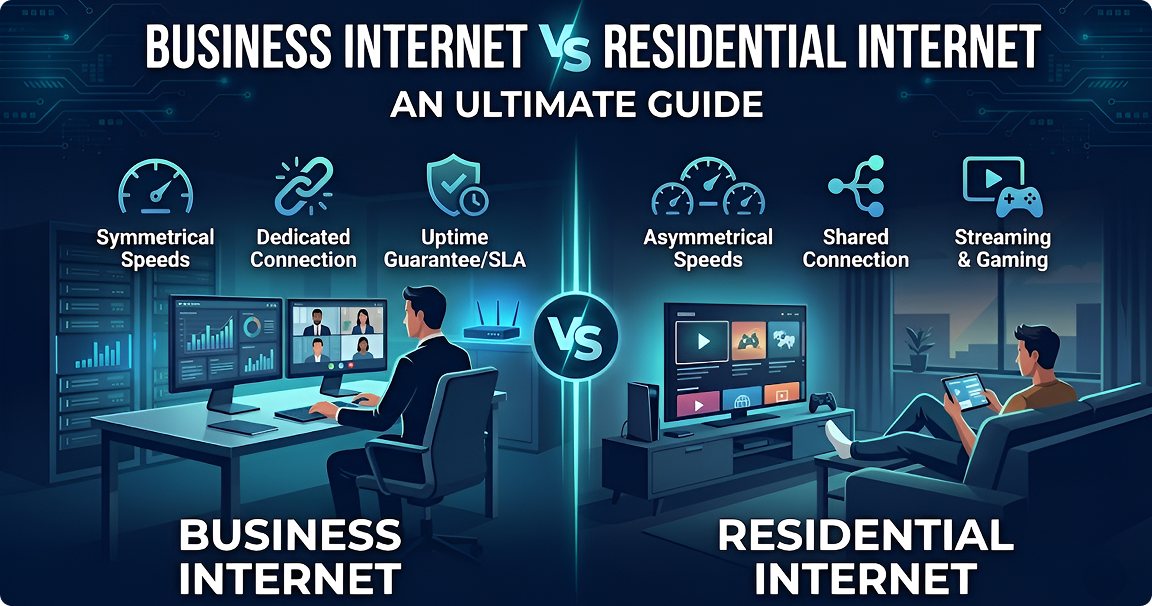
Choosing between business and home internet is a big move for any Canadian owner. It is one of the most vital setup choices you will make. At first, home internet might look like a way to save money for a small office. However, that choice can deeply affect how you work, how you treat customers, and how much you earn. The main difference is how the systems are built. Business internet focus is on staying online and working fast for vital tasks. Home internet is built for basic personal use.
In this guide, we will look at service deals (SLAs), how data is shared, and IP addresses. We will also talk about safety, costs, and how to scale up. Plus, we will explain why fiber is now the top pick for firms in Canada. We will also show you how to pick the best fix for your specific needs. By the end, you will know exactly which type of internet service truly backs your business.
Not Sure Which Internet Plan Fits Your Business?
What is Business Internet?
Business internet is a high-grade internet service. It is made for groups that need a fast, steady link. Unlike home internet service, business internet comes with “set” bandwidth. This means your speed stays the same even when many other people are online. Also, business plans come with a Service Level Agreement (SLA). This is a vow that your internet will stay up almost 100% of the time (usually 99.9% or higher). This keeps your work moving when it matters most.
These work-ready tools provide a static IP address. You need this to host a site, run email servers, or let staff log in from home (VPN). It also supports cloud-based phone systems (VoIP). Plus, business internet often has “symmetrical” speeds. This means you can send data out (upload) just as fast as you pull it in (download). This is a huge win for video calls, cloud work, and backing up your files. Canadian brands also give you 24/7 priority help with expert teams who know business needs.
The actual wires and tech behind the business internet are different from home networks. Providers set aside special resources to make sure you get top speed, even during the busiest parts of the day. Because of this, firms see less lag and fewer drops in service. This extra care means better results for heavy tools like Zoom, cloud software, and sales systems. These are the tools that modern Canadian firms rely on every single day to stay ahead.

Types of Business Internet Connections
Canadian firms can pick from several types of links. Each has its own speed and price. First, the fiber-optic business internet is the fastest and most stable. It sends signals as light through glass fibers. This allows for “symmetrical” speeds up to 10 Gbps. Fiber has the lowest lag and highest uptime. It is the best fit for firms that need a lot of power.

Cable internet
It is another top choice. It uses the same wires as cable TV to bring you the internet. While cable usually has fast download speeds, the upload speeds are often much slower. Still, cable is a good deal for small shops with average needs.

DSL (Digital Subscriber Line)
It uses old phone lines. Its speed depends heavily on how close your office is to the provider’s main hub.
For firms in the wild where wires don’t reach, there are wireless fixes. These include fixed wireless, business satellite internet, and 4G LTE backup. Fixed wireless pulls a signal from a nearby tower. Satellite beams from space. While these reach more places, they have more lag and lower speeds than fiber or cable. Many Canadian firms also use a 4G LTE backup business Internet. This keeps them online if their main line ever goes down.
Get Reliable Internet Built for Your Business
What is Residential Internet?
Home internet is made for personal use. It focuses on daily tasks like surfing the internet, streaming movies, social media, and gaming. These services use a “shared” model. This means you and your neighbors all share the same path to the internet. Because of this, your speed can drop a lot during busy times, like in the evening when everyone is home.
Unlike business internet, home plans are usually “asymmetrical.” This means you can pull data in quickly, but sending it out is slow. This works for watching Netflix, but it makes things like big cloud backups or clear video calls much harder. Also, the home internet uses dynamic IP addresses. These change often, which means you can’t easily host your own servers or keep a steady link for staff to log in from far away.
Home plans also lack a formal vow of uptime (SLA). Providers do not promise to keep you online 99% of the time. Plus, help teams for home users often work only during set hours. You might face long wait times and get less expert help. While home internet costs less, a single day of being offline can cost a business much more than the money they saved on the bill.

Types of Residential Internet Connections
Canadian homes can get online in several ways, depending on where they live.
Cable internet
It is the most common home choice. It uses the same wires once put in for TV. Big brands like Rogers, Shaw, and Videotron offer different speeds. However, your actual speed depends on how many neighbors are online at once.
DSL internet
It is another wide choice that uses phone lines. It covers many areas, but the speed gets much slower if you live far from the phone company’s main office.

Fiber internet
It is growing fast in cities and suburbs. It offers the best speeds for home users, but it is still hard to find in rural spots.

Satellite internet
It serves remote spots where nothing else works. It can be slow and can cut out during bad weather. Fixed wireless internet is also growing in rural Canada to bring the internet to underserved towns. Recently, phone companies have started offering home internet through 4G LTE and 5G networks. This gives people a wireless way to get broadband without needing a wire in the wall.
Thinking Residential Internet Is Enough?
Business vs Residential Internet: 8 Critical Differences
Understanding the distinctions between business and residential internet requires examining specific technical, operational, and financial factors. The following eight differences highlight why business internet represents a strategic investment rather than simply an operational expense for Canadian companies.
Service Level Agreements (SLAs) and Uptime Guarantees
A Service Level Agreement (SLA) is a legal contract that sets the minimum bar for your internet service. Business internet plans come with these strong contracts. They promise your internet will stay up for a set amount of time. Usually, this is 99.9% (which allows only about 8 hours of downtime a year) or 99.99% (which allows less than an hour a year). These deals also tell you exactly how fast the tech team must respond if something breaks. If a provider fails to meet these goals, you often get money back. For example, if your internet goes down for too long or isn't as fast as promised, you might get a credit on your bill. This keeps the provider on their toes. It ensures they put business clients first when they fix the network or plan for maintenance. Home internet is different. It almost never comes with an SLA. Providers usually just say they will do their "best" to keep you online, but they don't promise any specific numbers. If your home line stays down for days, you have very few ways to get your money back. For a business that needs the internet to make sales or help customers, this lack of a promise can be a huge risk to your profits.
Speed: Symmetrical vs. Asymmetrical
Business internet providers usually offer symmetrical speeds. This means you can send data out (upload) just as fast as you pull it in (download). For instance, a 500 Mbps business fiber line gives you 500 Mbps for both. This balance is vital for modern work. It keeps video calls clear, cloud apps fast, and large file backups smooth. It also helps if you host your own internet site or email server, as those need plenty of "pushing" power. Home internet is mostly asymmetrical. It is built for people who watch movies or download files. You might get a 500 Mbps download speed, but your upload speed might only be 20 to 50 Mbps. This works fine for Netflix, but it can slow a business down. It creates a bottleneck when you try to send big attachments, join a Zoom call, or sync files to the cloud. Also, home speeds can drop when everyone else in the neighborhood gets online. Business lines stay steady all day long. This is because the speed you pay for is yours alone; it isn't shared with the house next door. This reliability means your work won't stop just because your neighbors are home and streaming 4K video. It gives you a predictable path for all your critical tasks.
Bandwidth: Dedicated vs. Shared
Dedicated internet access offers, dedicated bandwidth: means you have a private lane on the internet highway. That space is yours and yours alone. It ensures your speed stays the same no matter what other people on the network are doing. If you pay for a 1 Gbps business line with dedicated bandwidth, you get that full power 24/7. This makes it perfect for heavy tasks and for offices where many people are online at once. Shared bandwidth: is what you find in most homes. Multiple houses in your area share the same "pipe." During busy times, like evenings or weekends - everyone is fighting for the same data. Your 500 Mbps speed might crash down to 100 Mbps or less. For a business, this makes the internet unpredictable. You never know if your connection will be strong enough for that important afternoon meeting. Because dedicated bandwidth is private, it is also easier to plan your tech needs. You can add new tools or cloud apps without worrying about the neighbors slowing you down. This is especially key for things that happen in "real time," like internet phone systems (VoIP) or video chats. In those cases, even a small dip in bandwidth can lead to choppy sound and frozen screens, which looks unprofessional to your clients.
IP Addresses: Static vs. Dynamic
Business internet plans come with one or more static IP addresses. This means your address on the internet stays the same forever. Static IPs are a must for firms that host their own internet sites, run email servers, or use VPNs for remote work. They also help with security cameras and sales systems. Having a set address makes it easy to point your company domain to your servers without it breaking. These permanent addresses also make your office safer. You can set your firewall to only talk to specific, known addresses. Also, many work apps and software licenses need a static IP to prove you are who you say you are. This setup makes managing your network much simpler. It also makes it easier to fix things if your connection ever has a hiccup. Home internet uses dynamic IP addresses. These change all the time, sometimes every day or every time you restart your modem. While this is fine for watching videos or browsing, it is hard for business. If your IP changes, your remote access will break, and your hosted tools will go offline. You won't be able to reach your office devices from home. While some home plans let you pay extra for a static IP, they still lack the expert support that comes with a real business plan.
Customer Support and Priority Service
As a business user, you get 24/7 priority help. Your calls are answered much faster, often in just a few minutes. The people on the other end are experts who know about work apps and office needs. Many times, they even monitor your line from their end. This means they can often find and fix a problem before you even notice your internet is slow. Many providers also give you a dedicated account manager. This person gets to know your office and what you need to grow. They help you plan for the future and make sure any repairs happen when they won't disturb your team. If something does break, business teams can send a technician to your door much faster than they would for a home user. These fast fix times are usually promised in your contract (SLA). Home support usually works only during the day. You often have to wait on hold for a long time. The agents follow a basic script made for simple home issues, not complex office setups. If you need a repair, it could take days for someone to show up. For a business, every hour of being offline means lost money and unhappy customers. This is why the expert support of a business plan is well worth the extra cost.
Security Features and Data Protection
Business internet comes with high-end cybersecurity services to protect your data and your clients. This often includes DDoS protection. This tool stops hackers from flooding your line with fake traffic to knock you offline. Many brands also offer "managed firewalls" and tools that watch for intruders. This keeps your network safe from cyber attacks 24 hours a day. It also makes it easy to set up VPNs. These are secure tunnels that hide your data while your team works from home. Since you have a static IP, you can set strict rules so that only your staff can log in. This is a huge win for firms that must follow strict laws about how they handle sensitive data or financial records. Home internet has basic safety, but it is mostly for stopping simple viruses or "phishing" scams. Home routers don't have the same "enterprise" power that a business needs. Because home lines are shared and use changing IPs, they can actually be easier for hackers to target. If you handle customer info or private files, the extra security of a business line is a vital way to lower your risk.
Pricing and Total Cost of Ownership
Business internet costs a fair bit more than home lines. You can expect to pay two to five times more each month. This depends on your speed, special perks, and your uptime vow. For example, a 500 Mbps business fiber line in 2026 might cost between CAD $50 and $500 a month. A home line with the same speed might only cost CAD $30 to $120. However, just looking at the monthly bill doesn't show the whole picture. You also have to think about the "total cost of ownership." This includes the cost of being offline and lost work time. When you look at the final cost, you must think about what happens when the internet goes down. Even a short break can stop your sales, freeze your team’s work, and hurt your name. In 2026, downtime for a small firm can cost up to $427 per minute. If your shop makes CAD $10,000 a day, just one day without the internet costs much more than the price jump between home and business plans. Also, the time lost to slow uploads and bad support adds up fast over the year. Business pricing includes many things that would be extra on a home plan. You get static IPs, top-tier help, and symmetrical speeds. In Canada, adding a static IP to a home line, if you even can, can cost CAD $40 to $60 a month on its own. Business contracts also offer better long-term value. You can get bulk deals and steady prices that won't jump up out of nowhere. Think of business internet as "work insurance." It protects you from the massive costs of being offline in our digital world.
Scalability and Growth Flexibility
The business internet is built to grow with you. You can add more speed as your firm gets bigger without needing new wires or a new provider. Companies can easily move from 100 Mbps to 1 Gbps, or even up to 10 Gbps in case of DIA. This makes it easy to add new staff, open new offices, or use more cloud tools. Many plans also let you boost your speed for a short time if you have a busy season. The actual network for business internet is made for growth. Providers keep extra space in their "pipes" and use the latest gear to handle high speeds. In 2026, as more firms use AI tools, having this extra power is key. Business contracts often include help with moving. They assist you in switching to higher speeds without your work ever stopping. This is very helpful if you plan to hire more people or use heavy cloud software soon. Home internet does not grow as easily. Your top speed is often stuck because of the wires in your neighborhood or the fact that you share your link. Even if a faster home plan comes out, you are still sharing that path with others, which can slow you down when it’s busy. Upgrading a home line often takes a long time, needs a pro to visit, and might require new gear. For a firm that wants to grow, starting with business internet ensures your internet connection helps you move forward instead of holding you back.
Business Internet vs Residential Internet: Side-by-Side Comparison
| Feature | Business Internet | Residential Internet |
|---|---|---|
| Upload/Download Speeds | Symmetrical (e.g., 500/500 Mbps) | Asymmetrical (e.g., 500/20 Mbps) |
| Bandwidth Type | Dedicated (not shared) | Shared among neighborhood |
| IP Address Type | Static IP(s) included | Dynamic (changes periodically) |
| SLA Included | Yes (99.9% or 99.99% uptime) | No formal SLA |
| Uptime Guarantee | 99.9-99.99% (8.76 hrs/year max) | Best effort only |
| Customer Support | 24/7 priority support, account manager | Business hours, longer wait times |
| Security Features | DDoS protection, managed firewall, VPN support | Basic router firewall |
| Monthly Cost (CAD) | $70-$500+ (500 Mbps fiber) | $30-$120 (500 Mbps) |
| Installation Time | 1-2 weeks with coordination | 5-10 business days |
| Best For | Mission-critical operations, multiple users | Home use, personal browsing |
| Contract Terms | 1-3 years with SLA protection | Month-to-month or 1-2 years |
| Scalability | Easy upgrades, flexible capacity | Limited by infrastructure |
| Terms of Service | Commercial use permitted, hosting allowed | Personal use only, no servers |
Note: Pricing and availability vary by location and provider. Contact CanComCo for specific quotes tailored to your business requirements and geographic area.
Still Deciding? Let Us Recommend the Right Plan
How to Choose Between Business and Residential Internet
Picking the best internet service requires a close look at your office needs today and your plans for tomorrow. Start by figuring out how much bandwidth you need. Think about how many people, apps, and devices will be online at once. If your team does a lot of video calls, cloud backups, or file sharing, you likely need symmetrical speeds. This is a major sign that business-grade internet is the right move for you.
Next, think about the cost of being offline. If a crash stops your sales, freezes your team’s work, or hurts your name, the SLA protection of a business plan is worth the price. You should also check if you need static IP addresses. These are required for hosting your own services, letting staff log in from home, or running internet-based phone systems (VoIP).
Security, Growth, and Rules
Safety First
If you handle private client data or money, or if you work in a regulated industry, you need the extra safety tools that come with business lines.
Plan for Growth
Think about where you will be in 2 or 3 years. If you plan to hire more staff or use more AI and cloud tools, business internet lets you scale up without a headache.
Follow the Rules
Most home internet contracts forbid business use or hosting servers. If you break these rules, the provider can cut your service without warning. Even if you work from home alone, a business plan keeps you on the right side of the law and gives you the help you need.
Why Fiber is the Gold Standard for Canadian Businesses
Fiber-optic internet is the best choice for any modern firm. It is faster, more stable, and lasts longer than old cable or DSL lines. Fiber uses light pulses through glass to send data. This allows for speeds up to 10 Gbps that are “symmetrical”, your uploads are just as fast as your downloads.
The Fiber Advantage
Weatherproof & Steady
Unlike copper wires, fiber is not affected by weather, power noise, or magnets. This means it stays fast and reliable no matter what is happening outside.
Ultra-Low Lag
Fiber has almost no lag (often under 5 milliseconds). This makes video calls and cloud tools feel instant. It also means almost no data is lost during the "trip," so your apps won't have to keep trying to send the same info over and over.
Future-Ready
Fiber can handle massive amounts of data. As things like 4K video and AI become normal, fiber is already built to handle the load. You won't have to worry about your tech becoming "old" in a few years.
Stronger Uptime
Fiber lines are very tough and often stay up 99.99% of the time. Providers also use "back-up paths" in their fiber networks. If one line is cut, the data just takes a different route to keep you online.
Fiber Internet Availability in Canada
Fiber internet is growing fast across Canada. In 2026, where you live and the size of your town still play a big role in what you can get. Major cities like Toronto, Montreal, Vancouver, Calgary, Edmonton, and Ottawa have excellent fiber coverage. Most firms in these areas can get “Fiber-to-the-Business” (FTTB). This means you have many choices and can find very good rates.
Key Providers by Region
Bell Canada
Runs one of the largest networks in the country. They serve businesses across Ontario, Quebec, and the Atlantic provinces. Bell is currently upgrading gear in over 220 communities to offer even faster speeds.
Telus
Provides deep fiber coverage in British Columbia and Alberta. They are also moving into Ontario and parts of Eastern Canada with their "PureFibre" network.
Rogers (including Shaw)
Covers Ontario, the Atlantic, and Western Canada. In many spots, they now offer "fiber-powered" speeds as high as 8 Gbps.
Regional Stars
Firms like SaskTel in Saskatchewan, Cogeco in Ontario and Quebec, and Eastlink in the East offer strong local fiber options.
Growth in Smaller Towns and Rural Areas
Cities like Winnipeg, Saskatoon, Regina, Halifax, and Victoria are seeing more fiber every day. While it used to be just for downtown offices, it is now reaching newer business parks and suburbs. For very remote spots, the news is also good. The Canadian government’s Universal Broadband Fund (UBF) is on track to bring high-speed internet to 98% of all Canadian homes and firms by the end of 2026.
How CanComCo Helps
We have deep ties with fiber providers in every province. This lets us find out exactly what is available at your specific address. We can help you set up fiber for a new office or move your current service. If fiber hasn’t reached you yet, we can suggest other tools, like high-speed wireless, to keep you running until the fiber lines arrive.
Get the Best Internet Plan for Your Business Today
Conclusion
The choice between home and business internet comes down to one thing: risk. As we have shown, there are eight big ways these services differ. Business internet gives you a vow of uptime, equal speeds, private bandwidth, and expert help. It is a tool built to help you grow, while home internet is a shared service built for fun.
While home internet is cheaper, business internet is a smart investment in your office setup. It protects you from the huge costs of being offline, slow work, and cyber threats. For almost every Canadian firm, the peace of mind and better results are well worth the price.
Fiber internet is the best path forward. It is the fastest and most reliable tech we have in 2026. As it spreads across Canada, more firms can finally get the power they need. Even if fiber hasn’t reached you yet, a business-grade cable or wireless plan still offers far more than any home service can.
CanComCo is here to be your guide. Don’t try to solve complex tech and contracts on your own. We use our ties with all the major carriers to find the best speed and price for your specific spot. We handle everything from the first check to the final setup.
Ready to upgrade your business internet?
Contact CanComCo today for a free talk and a custom quote built for your needs. We will look at your current setup, find the best deals in your area, and get you online with zero stress.
Frequently Asked Questions
Is business internet faster than home internet?
In 2026, both plans often show the same top speeds on paper. However, business internet is “faster” in real-world use because it is steady. Home internet slows down when your neighbors get online, but business internet uses a private lane that stays fast all day. Also, business plans offer symmetrical speeds. This means you can send data out just as fast as you pull it in. This makes tasks like video calls and cloud backups feel much faster than on a home line.
Why does business internet cost more in Canada?
You are paying for more than just a link; you are paying for certainty. Providers set aside special resources for you, vow to keep you online with an SLA, and give you 24/7 expert help. You also get a static IP and better safety tools. The higher price covers the cost of a “guaranteed” service rather than just a “best effort” one. For a firm where being offline means losing money, this extra cost is a vital part of the budget.
Do I really need a static IP address?
Most Canadian firms do. You need one if you host an internet site, run an email server, or use a VPN so staff can work from home. It is also key for security cameras and modern phone systems (VoIP). A static IP makes your network easier to run and more secure. Only very small shops that use 100% cloud tools and have no need to log in from far away can get by with a changing (dynamic) IP
What happens if my business internet goes down?
If you have a business plan, your contract (SLA) forces the provider to act fast. Once you call, they must often start fixing the issue within minutes. For big crashes, a pro is usually sent to your site within 4 to 8 hours. Many plans even watch your line for you and might start a fix before you even call. If they stay offline too long, they owe you money back. Many firms also add a 4G or 5G backup that kicks in instantly to keep them online during a repair.
Is it hard to switch from a home plan to a business plan?
It is usually quite simple. The move rarely causes a big break in your work. Once you pick a plan, a pro will visit to set up your new gear. If the wires are already there, it takes about 1 to 2 weeks. Fiber might take a bit longer. At CanComCo, we handle the whole move for you. We can even keep your home line active until the business one is 100% ready, so you never lose a minute of work.
How much speed does my business actually need?
It depends on your team and what you do:
- 1–5 Staff: 25–100 Mbps works for basic email and internet work.
- 5–20 Staff: 100–500 Mbps is better for cloud apps and video calls.
20+ Staff: 500 Mbps to 1 Gbps (or more) is best for big offices.
Keep in mind that video calls need about 5 Mbps per person, and cloud backups work best with high upload speeds. We can help you test your office to find your perfect speed.
Are there data caps on business internet?
Almost all business plans in Canada now offer unlimited data. This is vital for firms that use the cloud for backups or run video security 24/7. Some cheap starter plans might have a limit, but we usually suggest going unlimited to avoid surprise fees. CanComCo makes sure your quotes always show if the data is unlimited.
How long are business internet contracts?
Most stay between 1 and 3 years. Longer deals usually give you lower monthly rates and free setup. While this locks in your price, you should think about your plans for the next few years. If you might move or grow fast, a shorter deal or a month-to-month plan might be better, even if it costs a bit more. We help you find a balance between a low price and the freedom to change.
Can I get business internet at my house?
Yes. If you run a firm from home or work for a big company as a remote staffer, you can get a business line at a home address. You just need to show a business need and be willing to pay the business rate. This is a great move for pros who need a 100% steady link and fast uploads for video meetings with clients.
Is it okay to use a home plan for my business?
Yes, but It’s often less useful as the home internet lacks the support and speed you need to look professional. The small savings are not worth the risk of a crash that leaves you offline for days with no one to help.